Reducing Friction #
Over the past year, I’ve accidentally built a fairly elaborate cycling data pipeline. The funny thing is that the entire point of this setup is to make riding feel simpler, not more complicated.
At this point, every ride and workout I do gets automatically captured somewhere: bike commutes, long weekend rides, indoor trainer sessions, walks, strength training, and even my morning weigh-ins eventually flow through the same ecosystem. Not because I’m trying to become a professional athlete, but because I’ve found that automatic tracking is surprisingly useful over time. I like being able to see training load accumulate, look back at old rides, track gear mileage, and understand how consistently I’m actually exercising instead of relying on vague memory and optimism.
At the same time, I don’t want fitness tracking to become homework. I don’t want to manually export files between apps, I don’t want every bike ride to require charging half a dozen devices first, and I definitely don’t want every bike to feel like a burden. Over time, I ended up optimizing for one thing above all else: low friction.
Most of this setup is automatic. The only thing I really need to remember is to start a ride on either my watch or bike computer — and both of those are smart enough to nag me if I forget and start moving anyway.
This also isn’t intended as a guide to the objectively best ecosystem. I’m not especially loyal to Apple, Wahoo, Zwift, or any of the other tools involved here. This is simply the collection of devices and apps that made sense to me as I gradually fell down the cycling rabbit hole over the past year. You could absolutely build something very similar with Garmin or other platforms. The interesting part isn’t the individual gadgets — it’s how the pieces fit together.
Two Bikes, Two Philosophies #
One thing I realized fairly quickly is that different bikes should optimize for different experiences. My commuter bike and my “nice bike” serve completely different purposes, and the technology attached to them evolved accordingly.
My commuter bike is intentionally simple. It’s built around reliability and removing as much friction as possible. It has a 1x drivetrain because I value simplicity over maximizing gear range, and a dynamo hub powering permanently mounted lights, which means I never have to think about charging them — they just turn on automatically whenever the bike moves. I have a phone mount for navigation if I need it, but otherwise the goal is simple: grab the bike and leave.
I don’t want to strap on a heart rate monitor on my commute. I don’t want to remember to charge a bike computer. My commute is only about 25–30 minutes each way and most rides are fairly relaxed anyway, so I intentionally keep the experience lightweight.
For ride tracking, I simply use my Apple Watch running Apple’s built-in Workout app in Outdoor Cycling mode. The watch records GPS, speed, duration, and heart rate automatically. I also have a 4iiii Precision 3+ power meter installed on the bike, which pairs directly to the watch over Bluetooth and adds power and cadence data to the ride.
That might sound mildly ridiculous for a commuter bike, and honestly it probably is. But the power meter has an enormous battery life, supports Apple Find My, and quietly future-proofs the bike in case I ever decide to use it for longer rides or training. The end result is that even my casual commute rides end up with a complete set of data with almost no effort required on my part.
That’s really the key idea behind the whole setup: the technology should disappear into the background. I think this is especially important for commuter bikes. The best commuter setup is usually the one with the fewest excuses attached to it.
My other bike — the one I use for long rides — is a completely different story. That bike is built around comfort and performance over long distances and more intentional riding. When I head out for a long weekend ride, I do care about detailed ride metrics while I’m cycling and performance analysis afterwards.
For those rides, I typically use a Wahoo ELEMNT ROAM v3 bike computer, a Wahoo TRACKR heart rate strap (which tracks heart rate more consistently than my watch), and Favero Assioma pedal-based power meters (which are supposedly more accurate than the 4iii meter). Unlike my commuter setup, I generally don’t wear my Apple Watch on these rides at all — the bike computer becomes the primary recording device and display.
This gives me the same rich ride data: power, cadence, heart rate, GPS position, elevation - but it’s further augmented with internet-sourced weather data for temperature and wind speed/direction - data that become useful once a ride shifts from “transportation” into “training.”
Why I Track Everything #
There are two main reasons I track my rides so obsessively: training load and gear mileage.
The training side is probably the more obvious one. Once I started riding consistently, especially after adding structured indoor workouts and planned longer weekend rides , I found it genuinely useful to have all of my exercise history in one place. Being able to see training load accumulate over weeks and months gives me a much better sense of how consistent I’m actually being, how much fatigue I’m carrying, and whether I’m gradually building fitness or just randomly exercising.
I’ve also found that automatic tracking subtly changes behavior in a good way. It’s much easier to stay consistent when the data exists somewhere and forms a visible history over time. A 30-minute commute ride might not feel particularly meaningful on its own, but after a few months you realize those “small” rides quietly added up to hundreds of miles and a substantial amount of training load.
The second reason is much nerdier, but honestly just as practical: maintenance tracking.
Because all of my rides eventually flow into Intervals.icu, the app can track mileage on individual pieces of equipment. That means I get reminders when chains, tires, brake pads, or other components cross service intervals. I’m much more likely to maintain a bike correctly when software politely nags me about it.
This becomes especially useful once you own more than one bike. Trying to mentally track when each chain was last replaced or how many miles are on a set of tires gets surprisingly difficult surprisingly quickly.
One thing I don’t do, however, is push every workout to social media.
All of my activities eventually end up in Intervals.icu, so I have a complete personal training history, but only some activities get shared publicly to Strava . My commute rides, treadmill workouts, walks, and strength training sessions generally stay private. Long rides, events, scenic routes, and indoor interval sessions are much more likely to get posted publicly.
I didn’t make this distinction intentionally at first, but over time I realized I preferred it this way. Intervals became my private training database, while Strava became more of a curated social layer. Not every piece of exercise needs to become content for the internet.
That said, I’ll admit there’s one funny psychological exception: indoor interval workouts. Those do get uploaded to Strava, partly because the mild social pressure of other cyclists potentially seeing my workout history somehow makes me more likely to finish difficult interval sessions honestly. I have no idea why this works, but it absolutely does.
How the Data Actually Flows #
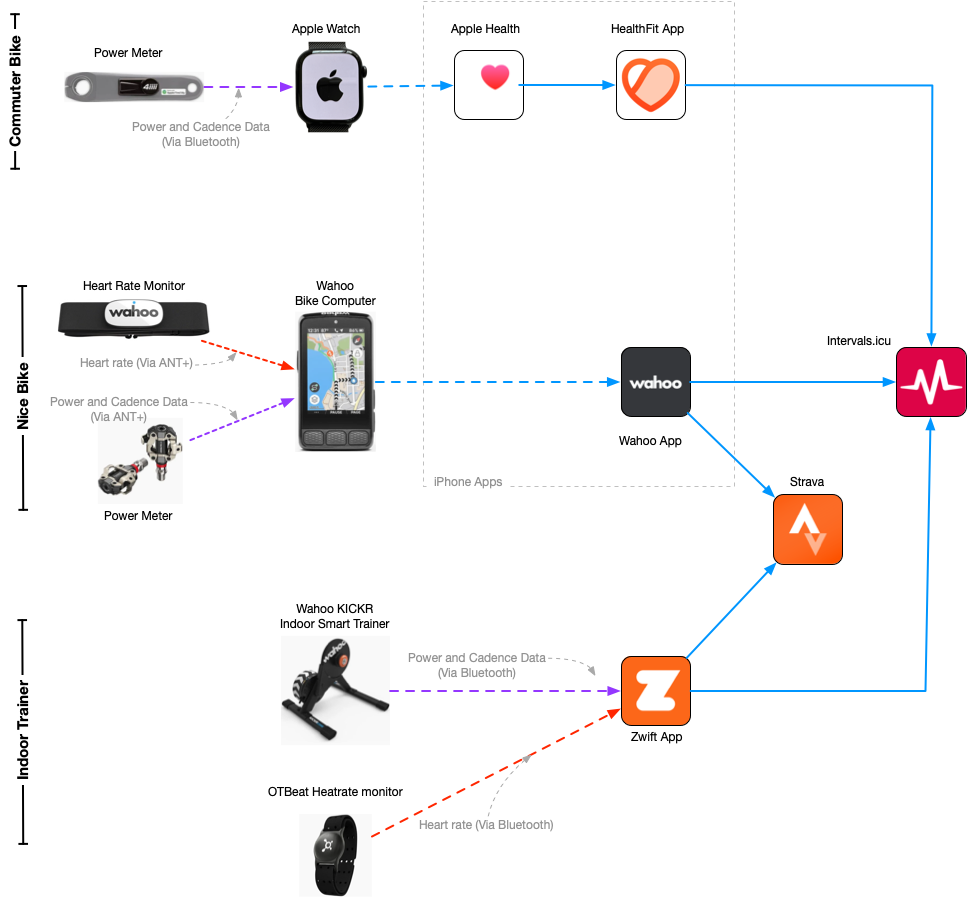
The interesting part of this whole setup isn’t really the devices themselves — it’s how the data moves between them.
My commuter bike follows a very Apple-centric flow. I record rides using the Apple Watch and Apple’s native Workout app, with the 4iiii Precision 3+ paired directly to the watch over Bluetooth. That workout gets saved into Apple Health automatically.
From there, I use HealthFit to sync activities from Apple Health into Intervals.icu. I originally chose HealthFit simply because I needed a reliable way to bridge Apple Health into Intervals and it seemed to be a commonly recommended solution, but I’ve ended up appreciating it quite a bit. It quietly handles synchronization in the background and can also sync broader health metrics like weight, resting heart rate, HRV, and sleep duration.
That same pipeline also captures non-cycling workouts recorded on my watch. Walks, treadmill sessions, and strength workouts all end up flowing into Intervals automatically through the same path. I even have a Withings smart scale that syncs weight data into Apple Health, which then eventually flows into Intervals through HealthFit as well. Once the plumbing exists, adding additional passive health data becomes surprisingly easy.
My “nice bike” uses a completely different recording flow. On those rides, the Wahoo ELEMNT ROAM v3 bike computer becomes the primary recording device, pulling data from my heart rate monitor and Favero Assioma pedals. The ride uploads automatically through the Wahoo ecosystem once I finish riding.
I have the Wahoo app connected to both Intervals and Strava, so those rides automatically get sent to both platforms. Intervals receives the ride for long-term analysis and record keeping, while Strava gets the social-facing version of the activity.
Indoor riding follows yet another path. I use a Wahoo KICKR CORE with Zwift for structured training sessions during the darker and wetter parts of the Seattle year. Zwift is connected directly to both Intervals and Strava, so completed workouts automatically flow into both services once the ride ends.
The important thing is that despite these different ingestion paths, everything eventually converges into a single place. Every ride, indoor or outdoor, easy or hard, structured or casual, ultimately ends up in Intervals. That gives me one consistent training history across all bikes and activities without requiring much active effort on my part beyond remembering to hit “Start Ride.”
Why Intervals.icu Became My Source of Truth #
At the center of all of this is Intervals.icu.
I originally started using it for a very simple reason: it was free, and people on cycling forums kept saying surprisingly good things about it. At the time, I mostly just wanted a place where all of my rides could end up together regardless of whether they came from my Apple Watch, Zwift, or bike computer.
Over time, though, it gradually became the dashboard I open almost every day.
Part of what I like about Intervals is that it feels very focused on analysis and training rather than social engagement. Strava is great for seeing where friends rode, discovering routes, and sharing interesting activities. Intervals feels more like a personal training notebook that happens to be extremely data-aware.
It’s where I look at long-term fitness trends, training load, power curves, weekly volume, fatigue, equipment mileage, and workout history. It’s also where I plan workouts and think about future training blocks. I’m barely scratching the surface of what it can do, honestly, and I’ll probably write a separate post specifically about how I use it.
One thing I particularly appreciate is that Intervals doesn’t really care where the data came from. Outdoor rides, indoor rides, walks, strength sessions, and health metrics all quietly coexist in the same timeline. Once everything flows into a single system consistently, interesting patterns start to emerge almost accidentally.
I’ve also found that having a unified history becomes increasingly motivating over time. There’s something deeply satisfying about opening an app and realizing that hundreds of rides, workouts, and small decisions have quietly accumulated into a meaningful body of work.
That’s probably the biggest lesson I’ve learned from all of this: consistency compounds in ways that are difficult to notice day-to-day but become obvious in aggregate.
What I Learned Building This Setup #
If there’s one theme running through this entire system, it’s that automation matters far more than perfection.
The biggest failure mode for fitness tracking isn’t inaccurate data — it’s friction. Every extra manual step becomes another opportunity for the system to quietly fail. If syncing requires exporting files manually, charging too many devices, or remembering complicated workflows, eventually you stop doing it consistently.
That’s why I’ve become such a fan of passive data collection. Most of my rides and workouts now flow through the system automatically with almost no thought required on my part. The less effort the system requires, the more sustainable it becomes long term.
I’ve also learned that it’s completely okay to mix ecosystems.
Cycling internet discussions sometimes make it sound like you need to fully commit to a single vendor universe — Apple or Garmin, Wahoo or Hammerhead, Strava or TrainingPeaks. In practice, most of these platforms are surprisingly interoperable if you spend a little time thinking about the data flow itself instead of the individual devices.
My setup ended up being a weird mixture of Apple, Wahoo, Zwift, Strava, Intervals, Withings, 4iiii, and Favero products mostly because those were the tools that happened to make sense to me at the moment I bought them. There was never some grand architectural plan behind any of this.
I also think separating private analytics from public sharing was healthier than I expected.
Intervals contains essentially my complete exercise history, including the boring stuff: commute rides, treadmill walks, recovery rides, strength workouts, and random bits of movement throughout the week. Strava, meanwhile, has become more of a highlight reel — long rides, scenic routes, events, and interval sessions that feel more interesting to share socially.
That separation makes both platforms feel more useful to me.
And finally: I’ve learned that the point of all this data isn’t to obsess over numbers constantly. The point is to reduce mental overhead and make consistency easier. The technology works best when it fades into the background and quietly supports the habit itself.
The real goal isn’t building the perfect fitness dashboard.
The real goal is riding more bikes.